Video Player All Format-wTuber
- 4.5
- Rating
- 5.00M
- Installs
- Free
- Price

 Analysis by App-foxy
I approached Video Player All Format-wTuber as an everyday media app rather than as a feature checklist. Its main appeal is straightforward: it brings music playback and video playback into one place, which can be useful when I do not want separate tools for listening to audio, watching clips, and opening files. The experience is aimed at Android users who want a practical player with a broad media focus, but its usefulness depends heavily on how they organize their files and how much control they expect from a dedicated specialist player.
The app sits in the Video Players & Editors category and is developed by Music & recorder apps. It is free to install, with optional in-app purchases ranging from $2.99 to $25.99 per item. The store lists a 4.5 average from around 77 thousand ratings and more than 5 million installs, so it has clearly attracted a substantial audience. It is rated for Mature 17+ users, runs on Android 7.0 and later, and its current version is 7.6. Those details matter if you are choosing it for an older phone or for a household where age ratings influence which apps are appropriate.
How readable and manageable the player feels
My first impression is that the all-in-one approach makes the app easy to understand at a basic level. I can think of it as a single destination for media instead of deciding whether a file belongs in a music app or a video app. That simple mental model benefits people who are not interested in learning several interfaces. If someone in the family regularly asks where to open a downloaded song or video, having one recognizable player can reduce that small but repeated source of confusion.
You May Also Like

 Blood Strike: 2.5 Anniversary
Blood Strike’s Loadouts Turn Every Drop Into a Tactical Gamble
A close look at Blood Strike’s custom loadouts: how fast access to signature weapons reshapes its battle royale rhythm, rewards preparation, and narrows the gap between fights.

 Pandora - Music & Podcasts
Pandora’s Music Is Easy to Start, but Harder to Recover
Pandora’s strength is its low-effort path from a seed to a station. Its weak spot is how much confidence it asks you to place in connection, setup, and quiet recovery.

 8 Ball Pool
 Is Built on Rivalries, Rematches, and Routine
A close look at the rivalries, rematches, shared routines, and unanswered safety questions that turn a quick pool match into a persistent mobile community.

 Samsung Music
’s Quiet Strength Is Playing What You Already Own
Its reach comes less from spectacle than from dependable access to a personal library. That simplicity is both the app’s strongest retention engine and its ceiling.

 AccuWeather: Weather Radar
AccuWeather Review: A Quick, Clear Forecast for Everyday Decisions
For everyday plans, the best forecast is the one you can understand quickly. AccuWeather makes rain timing, radar, and local conditions easy to act on, with a few trade-offs.

 Hill Climb Racing
Why Hill Climb Racing Still Turns Crashes Into One More Run
A tiny car, a bumpy hill and one more upgrade: Hill Climb Racing keeps resurfacing because its simple chaos makes every near-miss feel personal.
More From Our News Desk



For readability, the important question is not only whether labels exist, but whether the screen remains comfortable when I am using it quickly. A media player is often opened while I am doing something else: starting a playlist before a commute, checking a downloaded clip, or handing a phone to another person. Clear grouping between music and video content is therefore more useful than a crowded collection of controls. I found the combined purpose convenient, although users who prefer a very minimal audio-only interface may feel that the video side adds visual weight they do not need.
Navigation also changes depending on the size of a personal library. With only a few files, an all-in-one player can feel efficient because I can reach everything from one place. With a larger collection, organization becomes more important. I recommend creating a simple habit before relying on it heavily: keep music and videos in clearly named folders, use consistent filenames, and remove duplicate downloads. This is a small step, but it makes browsing easier for anyone who has difficulty scanning dense lists or remembering where a file was saved.
The app is best suited to people who want immediate playback rather than a complicated media-management system. I would not choose it expecting the same depth of catalog organization as a dedicated music service or the same specialized workflow as a professional video editor. Its strength is the meeting point between those two uses. That distinction helps set expectations: it is a convenient player first, not a replacement for every tool connected with media.
Useful routines for different reading needs
One practical routine is to use the app as a “check before sharing” player. If I receive a video or audio file and need to confirm that it opens correctly, a combined player saves me from switching between applications. This can help users who find app-hopping tiring or confusing. I can open the file, check the sound, watch enough to confirm that it is the right clip, and close it without building a separate workflow.
Another useful habit is to keep frequently used media easy to identify through filenames rather than relying on memory. Names such as “meeting-recording,” “language-practice,” or “family-video” are more helpful than a sequence of downloads with unclear labels. This is not a special function of the app; it is a way of making its browsing experience more accessible through preparation. People with attention difficulties, limited vision, or a busy routine often benefit more from a predictable file structure than from having many advanced controls.
I also recommend checking the interface at the phone’s normal display settings before deciding whether it is comfortable. Larger system text can make menus easier to read, but it can also cause labels or controls to occupy more space. A player that feels fine at default settings may feel cramped when text is enlarged. Testing the app with the settings you actually use is more reliable than judging it from a quick glance.
Motor, hearing, and visual considerations
Media playback is usually a forgiving task because I can start a file and let it run, but controls still matter. Play, pause, seeking, volume, and returning to the library are actions I may need to perform with one hand, in poor lighting, or while the phone is resting on a table. Large, well-separated controls are easier for people with limited dexterity than tightly packed buttons. In practice, I would spend a few minutes learning where the main controls appear before using the app in situations where reaching the screen is inconvenient.
The combined audio and video design can support different sensory preferences, but it should not be treated as a complete accessibility solution. Someone who mainly listens may appreciate being able to use the app without watching the screen after playback begins. Someone who relies on visual information may prefer videos that already include readable captions or clear on-screen text. The app can play media, but the accessibility of the media itself still depends on how that file was created. A poorly captioned video remains difficult to follow even when the player opens it smoothly.
For users with hearing loss, I would judge the experience file by file. A video with accurate captions, strong visual cues, and clear speaker changes can be useful. An audio recording without a transcript will remain limited. For users with low vision, contrast, text size, and the ability to identify controls quickly become central. I would avoid assuming that every icon is self-explanatory; if a control is represented mainly by a symbol, taking time to identify it in a quiet setting is safer than trying to discover it while traveling or multitasking.
Motor access is similarly situational. A person who has difficulty with precise taps may prefer starting playback before placing the phone somewhere stable, rather than trying to operate small controls repeatedly. If seeking through a long video requires accurate dragging, short jumps may be easier than attempting to land on an exact moment. This is one of the trade-offs of a general-purpose player: it can cover ordinary playback, but it may not offer the specialized interaction options that some users expect from accessibility-focused software.
What the all-in-one design changes in daily use
A realistic example is a long train journey. Before leaving, I could place a few music files and saved videos in clearly named folders, open them in the same application, and avoid switching between separate players when the network is unreliable. If I have limited dexterity, preparing the queue in advance is more comfortable than searching while the train is moving. If I have hearing-related needs, I would select videos with captions before the trip rather than discovering halfway through that the content depends entirely on spoken dialogue.
At home, the app can also suit a shared-device situation. One person might use it for music while another opens a family video. The advantage is not that it magically solves every navigation problem, but that everyone only needs to recognize one media tool. That can be helpful for older relatives or occasional users who do not want to memorize several app layouts. The drawback is that a shared library can become cluttered quickly, so folders and descriptive filenames are especially valuable.
For study or work, I can see a narrower but useful role. A learner might keep recorded lessons and demonstration videos together, making it easier to move between listening and watching. However, I would not treat it as a full study platform. If I need notes, searchable transcripts, detailed bookmarks, or classroom management, a dedicated learning app is likely a better fit. The player can be one part of that workflow, not the whole workflow.
Where the app fits beside familiar alternatives
Compared with a phone’s default music player, the main difference is the broader media focus. A basic built-in player may feel cleaner when I only listen to locally stored songs, especially if I already like its library sorting and lock-screen controls. wTuber becomes more appealing when I regularly move between audio and video and prefer not to maintain separate habits. The choice is therefore less about which app is universally better and more about whether mixed media is part of my normal routine.
Compared with a dedicated video player, this app’s attraction is convenience. A specialist video tool may offer a more refined viewing workflow, more detailed playback controls, or stronger handling for people who spend hours watching varied formats. If watching video is my primary activity and I care deeply about fine control, I would compare those tools carefully before switching. The all-in-one design may be enough for casual and regular playback, but convenience can come with fewer specialized options.
Compared with streaming services, the use case is different. A streaming app is built around finding online content, while a local media player is useful for files already stored on the device. That makes wTuber relevant for downloaded clips, personal recordings, offline material, or media received through other channels. I would not install it expecting a discovery catalog or a subscription library. Its value comes from opening and managing personal media in one place.
The free entry point is another practical advantage, although the presence of optional purchases means I would review any upgrade prompt carefully before paying. The listed purchase range is wide enough that users should avoid assuming every function is included without cost. For someone who only needs straightforward playback, the free experience may be the sensible starting point. I would use the app for a while, identify an actual limitation, and only then decide whether an optional purchase solves a problem I genuinely have.
Situational access and the barriers I would plan around
Context can make a good player feel very different. In bright sunlight, on a moving vehicle, or while wearing gloves, precise on-screen interaction becomes harder. In a quiet room, audio playback may be comfortable; in a noisy place, a video without captions may become frustrating. I would prepare content according to the environment rather than blaming the player for every difficulty. Downloading the right files, increasing volume safely, and choosing captioned videos can make a larger difference than changing apps.
Older devices deserve particular attention. Because the app supports Android 7.0 and later, it can be considered by people using phones that are not recent, but smoothness will still depend on the device, the media file, and available storage. I would test a representative selection of files instead of assuming that one successful short clip proves everything will work. Large or demanding videos can expose limits that do not appear during a quick test with a small file.
Storage management is another overlooked barrier. An all-in-one player is only useful when the phone can access the media, and a crowded device can make browsing and downloading more stressful. I recommend keeping only the files I actually use, archiving important recordings elsewhere, and using clear folders. This is especially important for users who rely on offline access, because an inaccessible or misplaced file defeats the benefit of having a local player.
The Mature 17+ content rating is also relevant when choosing the app for a younger user. I would not treat a media player as automatically suitable for every family member simply because its basic purpose is playback. Parents and guardians should consider the rating alongside the kinds of files the device contains and how the phone is supervised. For an adult user, the rating is simply part of the installation decision; for a shared family phone, it deserves more attention.
Privacy and permission decisions should be handled with the same care I use for any media app. I would read each Android prompt, allow only what is necessary for the way I intend to use the player, and revisit settings if my needs change. I would also avoid storing sensitive recordings in an unorganized shared folder. These steps do not add features, but they reduce the chance of opening or sharing the wrong file, which is a real concern when audio and video are kept together.
My inclusive verdict after using its main workflow
The strongest reason to choose Video Player All Format-wTuber is the reduction of app switching. I can see it helping people who keep both songs and videos on an Android phone, need offline playback, or want a single familiar place for personal media. Its audience size, reflected in a 4.5 average and over 5 million installs, suggests that this straightforward idea resonates with many users. I would recommend beginning with a small, organized library and testing the controls under the conditions where the app will actually be used.
It is less convincing for someone who wants a highly specialized music library, a professional video workflow, extensive study tools, or carefully tailored accessibility controls. In those cases, a dedicated alternative may offer a better fit even if it means managing more than one app. I would also be cautious about recommending it to a child because of the Mature 17+ rating, and I would not pay for optional purchases until I understood exactly which personal limitation they address.
My final view is positive but practical. This is a useful general-purpose media player, not a universal answer to every playback or accessibility need. Its inclusive value comes from keeping the basic task approachable: one app for music and video, a free starting point, and compatibility with older Android versions. The best results come from pairing it with good preparation—organized folders, descriptive filenames, captioned media when needed, and a quick test on the actual device.
If that matches your routine, I think it is worth trying. If your priority is a meticulously managed music collection, advanced video control, or specialized support for a particular disability, I would compare it with a purpose-built player first. For everyday local playback, however, wTuber offers a sensible middle ground, especially for users who value a familiar, mixed-media workflow more than a long list of specialist settings.
FAQs for Video Player All Format-wTuber
01What is Video Player All Format-wTuber used for?
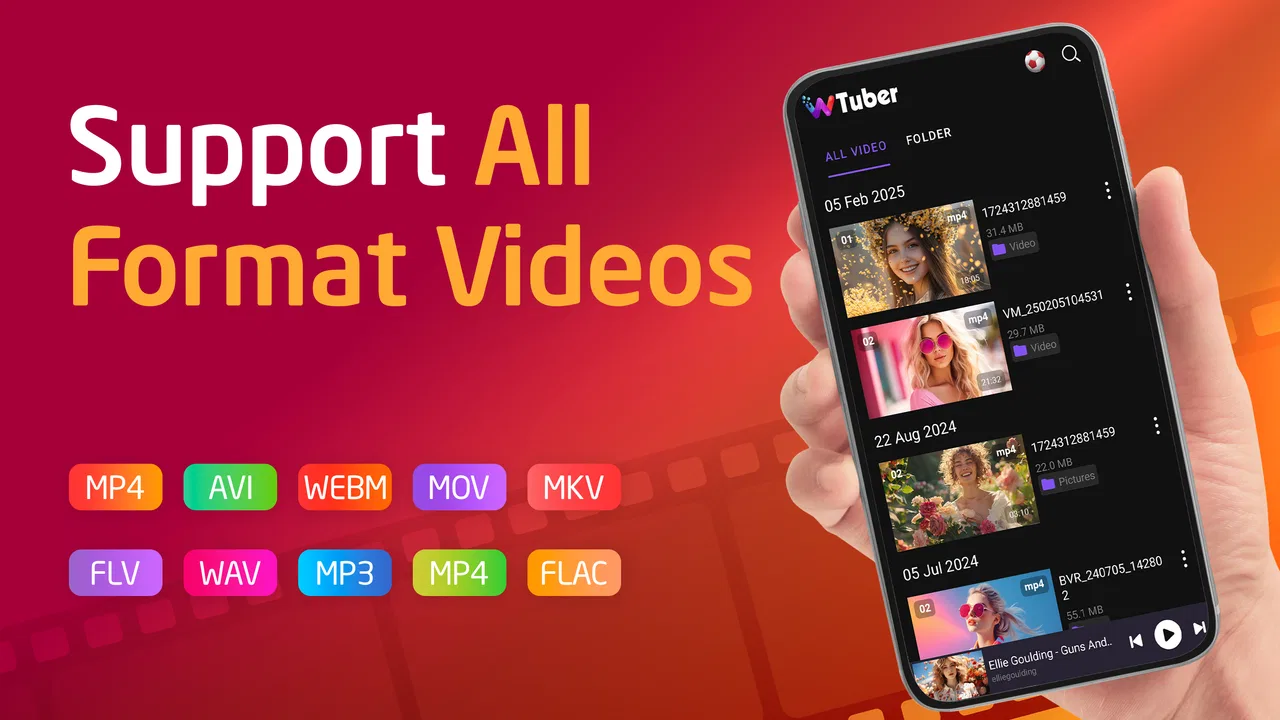
Video Player All Format-wTuber is designed to play locally stored videos in a wide range of file formats from an Android device. It can be useful when the default phone player does not recognize a particular video type. After testing the app, its main appeal is its straightforward playback experience, with common controls such as play, pause, seeking, volume adjustment, and screen orientation options.
02Which video formats does Video Player All Format-wTuber support?
The app is promoted as an all-format video player, meaning it is intended to handle many popular formats and codecs rather than only standard MP4 files. However, actual compatibility may depend on the device, Android version, video encoding, resolution, and audio codec. Before downloading, users should check the current store description and reviews, especially if they need to play unusual, high-resolution, or professionally encoded files.
03Does Video Player All Format-wTuber require internet access?
For playing videos saved on your device, Video Player All Format-wTuber generally does not need a continuous internet connection. This makes it suitable for watching downloaded movies, personal recordings, or transferred files while traveling. Internet access may still be requested for advertising, analytics, updates, or optional online features. Users should review the permission list and privacy information before installation to understand how the app handles network access.
04Is Video Player All Format-wTuber free to download and use?
Video Player All Format-wTuber may be available as a free download, but free apps can include advertisements, optional purchases, or limitations depending on the version published in the app store. The exact business model can change over time, so users should verify the listing before installing. If uninterrupted playback is important, check whether the app offers an ad-free upgrade and whether that purchase is clearly explained.
05What permissions does Video Player All Format-wTuber need?
A video player normally needs permission to access media files so it can scan folders and play videos stored on the phone. On newer Android versions, this may appear as permission to access photos and videos rather than general storage. The app should not need unrelated permissions for basic playback. If it requests access that seems unnecessary, users should review the privacy policy, deny optional permissions, or choose another player.
Pros
- Supports many video formats without extra codec downloads.
- Includes subtitle support for a more accessible viewing experience.
- Offers gesture controls for volume
- brightness
- and seeking.
- Can play videos stored locally without requiring an internet connection.
- Simple interface makes basic playback easy for most users.
Cons
- Ad-supported playback may interrupt the viewing experience.
- Some advanced features may require in-app purchases or upgrades.
- Large video files can use considerable storage and battery power.
- Compatibility may vary with uncommon codecs or damaged video files.
- Background playback and floating-window options may be limited on some devices.

Video Player All Format-wTuber
Gallery